![Logo Standard Medium.png]](https://help.exordo.com/hs-fs/hubfs/Logo%20Standard%20Medium.png?height=40&name=Logo%20Standard%20Medium.png)
The new People Hub is currently in beta and not yet available on all sites. If you'd like to learn more or check availability for your site, please email support@exordo.com.
Once you've created a tag or have had tags synced from your AMS, you can apply it to one or more people so they're can avail of member specific pricing.
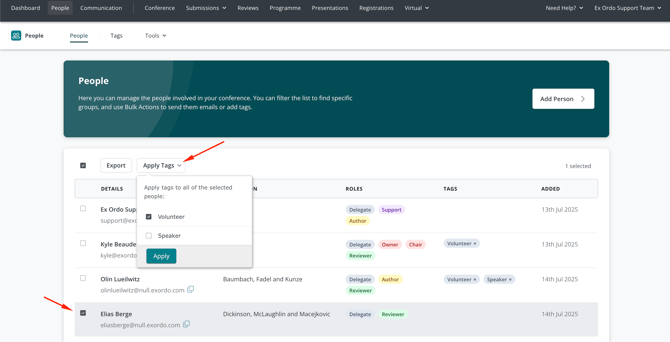
- Select People at the top of the page.
- Select the checkbox next to one or more people, or the header checkbox to select everyone in your current (filtered) list.
- Select the Apply Tags menu
- Select one or more tags, and Apply them.
- Confirm your choice in the pop up window
You can:
- Delete the tag on the Tags tab. This will remove the tag from all site users.
- Place a check next to a person's name and use the tags drop-down to remove an existing tag.
- Select the X on a specific tag in the Tags column and confirm your choice.
Removing a tag from a person will not impact their previous registration.