![Logo Standard Medium.png]](https://help.exordo.com/hs-fs/hubfs/Logo%20Standard%20Medium.png?height=40&name=Logo%20Standard%20Medium.png)
This article explains how you can send a message to review group chairs.
- Click on the Communication hub at the top of the page
- Select the New Message button
- On step 1, choose Review Group Chairs as your recipient group
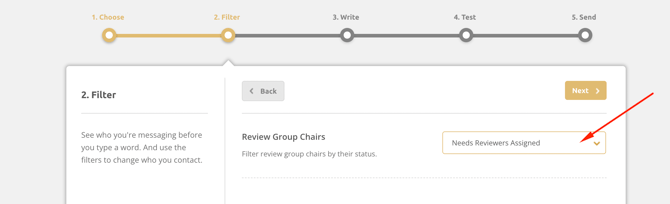
- On step 2, you can choose to contact all Review Group Chairs or filter the list and contact only review group chairs that have:
- not added reviewers
- not assigned reviewers to submissions
- pending reviews - you may ask the chairs to contact reviewers because the deadline is approaching
- all reviews completed
- outstanding (unfinished) reports - you may ask the review group chairs to complete their reports so you can assign decisions
- completed reports - now it's time to say thank you!
- Click Next.
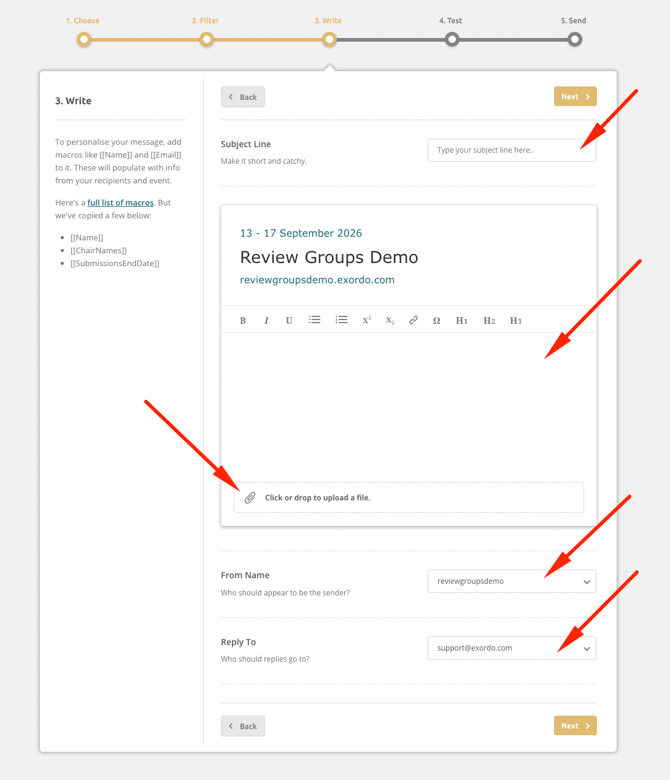
- On step 3, you can:
- name your email
- write your email
- add an attachment
- change the From Name
- change the Reply to Email
- On step 4, you will see your email. You can:
- Check your email
- Send yourself a test email to your inbox
- Go Back to make changes
- Click Next to send the email to review group chairs
- You can now click the Send Message button to send your email