![Logo Standard Medium.png]](https://help.exordo.com/hs-fs/hubfs/Logo%20Standard%20Medium.png?height=40&name=Logo%20Standard%20Medium.png)
The Ex Ordo platform has a single abstract text box in the system by default. It is mandatory and you can set a word limit, if needed. When submitting, authors would be able to input their abstract into the field on the Title & Abstract step.
The platform you are using may not be collecting abstracts. The organisers may be collecting files only. This article is not relevant to platforms that are not collecting abstracts.
Some conferences need to have separate abstract fields. For example, you may need to have a box for the introduction, a box for results and a box for keywords.
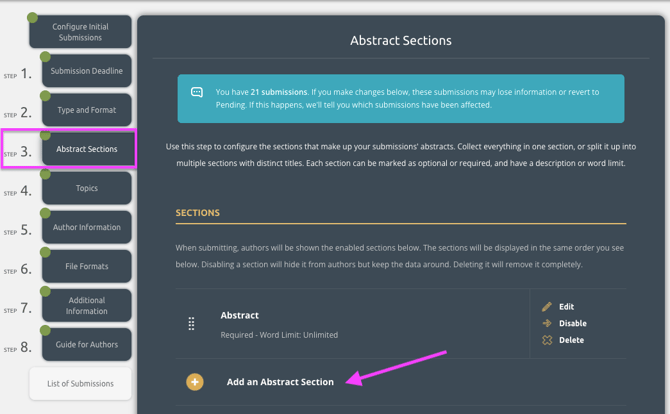
This can be configured in Step 3 Abstract Sections.
Click on Add an Abstract Section:
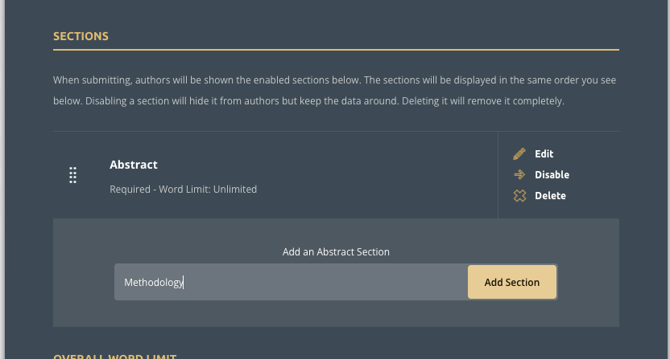
Then type in the New section name, and click on Add Section:
You can now define more deatails about this abstract box:
- Title
- Description
- Requird or Optional
- Word limit
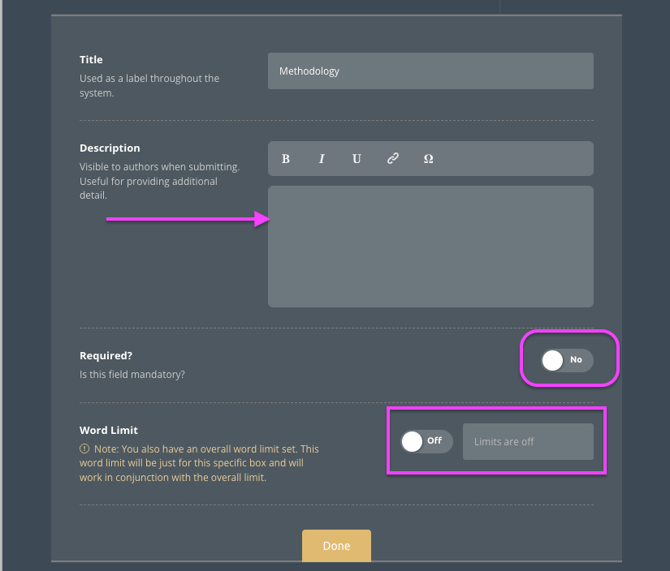
Note: If you have an overall word limit set, this word limit set on the box will be just for this specific box and will work in conjunction with the overall limit. You should either use the limit per box or the overall limit.