![Logo Standard Medium.png]](https://help.exordo.com/hs-fs/hubfs/Logo%20Standard%20Medium.png?height=40&name=Logo%20Standard%20Medium.png)
You can contact delegates through the Communication hub if the registration hub is enabled and at least one person has registered. This article walks you through the full process.
- Click on Communication hub at the top of the page
- Click on the New Message button
- On step 1, choose Delegates as your recipient group.
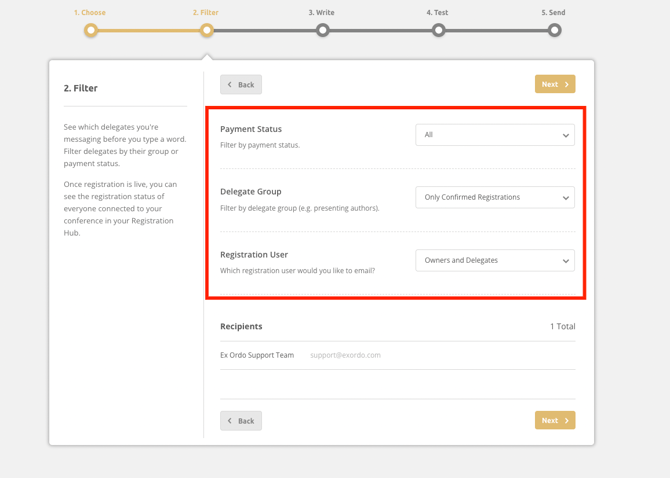
- Apply filters on step 2, if needed. Click Next when ready. Filter options include:
- Payment status
- Delegate group
- Registration User
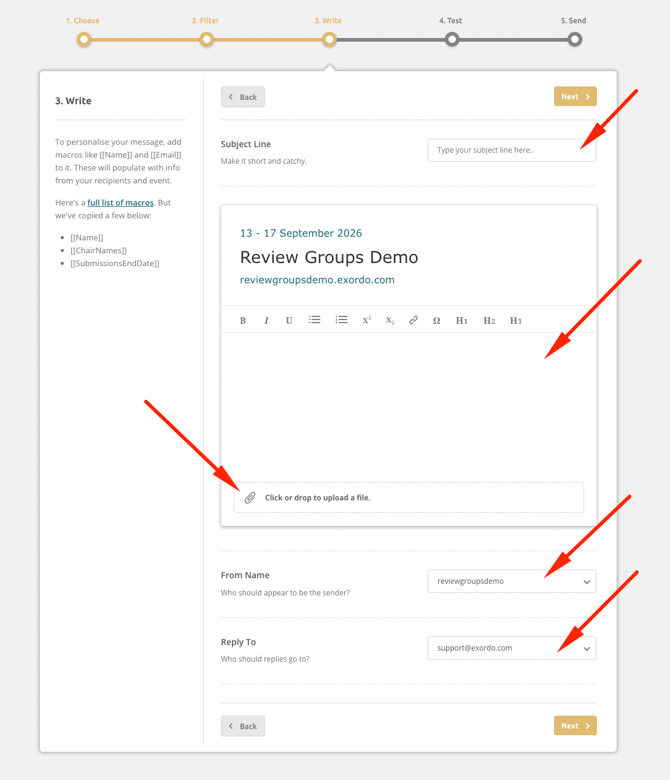
- On step 3, you can now:
- Name your email
- Write a message. Be sure to use macros to personalise the email.
- Attach a file (optional)
- Change the From Name (optional)
- Change the Reply to Email (optional)
- Happy with your email? Click Next.
- Step 4 allows you to see and test your email. You can.
- Check your email
- Send yourself a test message to your real inbox
- Click Back to make changes
- Click Next to send your message
- Nearly there! You can click Send Message on step 5 to send the email to your delegates.