![Logo Standard Medium.png]](https://help.exordo.com/hs-fs/hubfs/Logo%20Standard%20Medium.png?height=40&name=Logo%20Standard%20Medium.png)
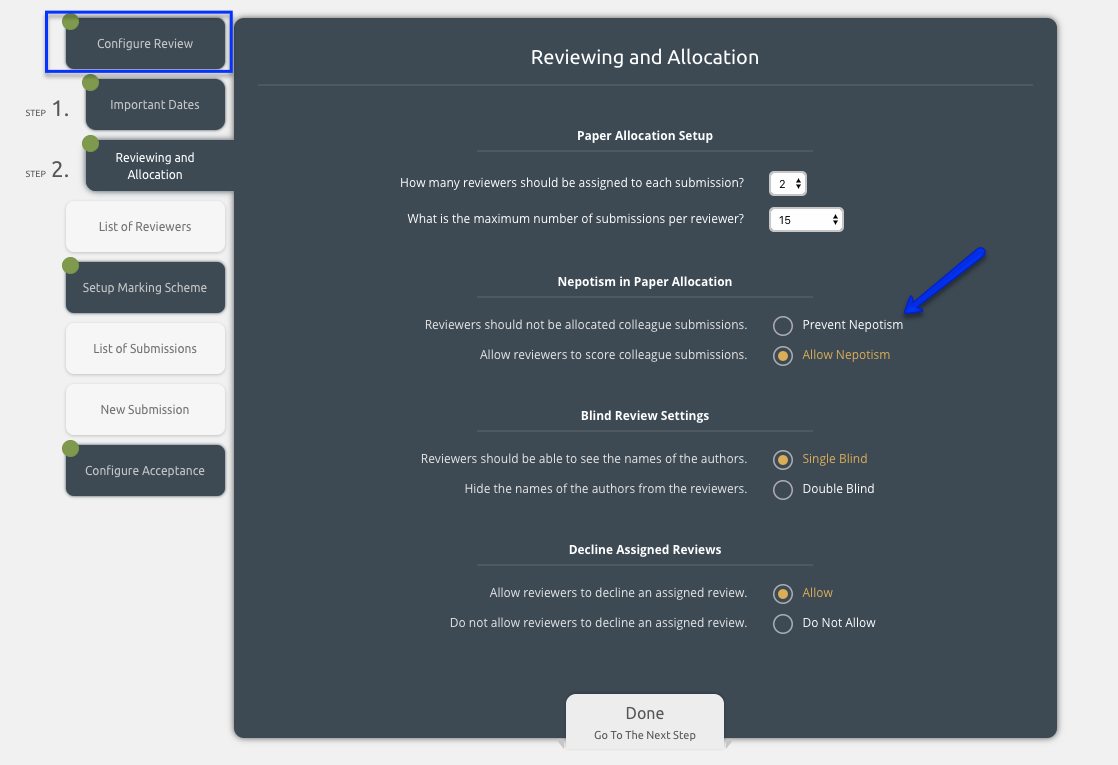
When configuring your review, you may decide that all reviewers could potentially review all submissions, regardless of whether they know the authors. This is easy to allow for, simply select Allow Nepotism on the options below.
However, sometimes you may need to account for reviewers and authors knowing each other.
In the system, you can then select Prevent Nepotism.
This nepotism check is very powerful. When running your allocation, the system tries to match reviewers with submissions. Depending on your settings, you can choose what is considered as the nepotism criteria to not match a reviewer with a submission.
- By Email: authors and reviewers with the same email domain will not be matched together e.g. the reviewer john@exordo.com could not be matched to a submission with the author mary@exordo.com. This is enabled by default.
- By Organisation: authors and reviewers from the same organisation will not be matched together e.g. a reviewer from Ex Ordo could not be matched to a submission with at least one author from Ex Ordo. This is enabled by default.
- By Country: authors and reviewers from the same country will not be matched together e.g. a reviewer from Ireland could not be matched to a submission with at least one author from Ireland.
Please email support@exordo.com to request that we disable email nepotism or enable country nepotism.
You can prevent nepotism by:
- Going to the Reviews hub at the top of the page
- Opening the Configure Review Menu
- Selecting the option Prevent Nepotism