![Logo Standard Medium.png]](https://help.exordo.com/hs-fs/hubfs/Logo%20Standard%20Medium.png?height=40&name=Logo%20Standard%20Medium.png)
As an author, or co-author of a submission, you can withdraw your submission when needed from the Initial Submissions or Final Submissions list. If you cannot, the organisers may have closed the system to edits by authors, but you can always contact them to withdraw on your behalf.
It is important to note that, as an author, you cannot delete the material completely. The reason for this is that once deleted, the submission is no longer visible to administrators or authors and cannot be recovered without help from the Ex Ordo team.
Step 1) Finding the submission to withdraw
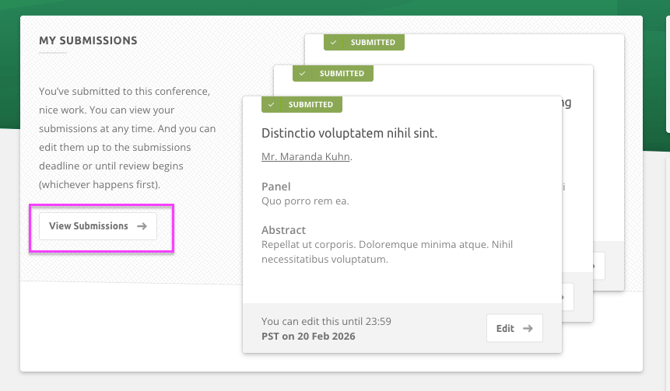
If this is your initial submission to the conference and it has not been reviewed, you can find the submission by viewing the My Submissions card. If this material has been reviewed, you can find the submission by viewing the My Final Submissions card. From both of these, you can click View Submissions to access the full submission list.
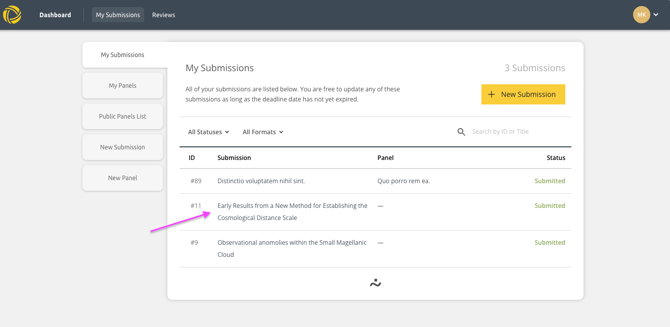
From the list that opens, you can click on the title to open the submission information.
Step 2) Withdrawing the submission
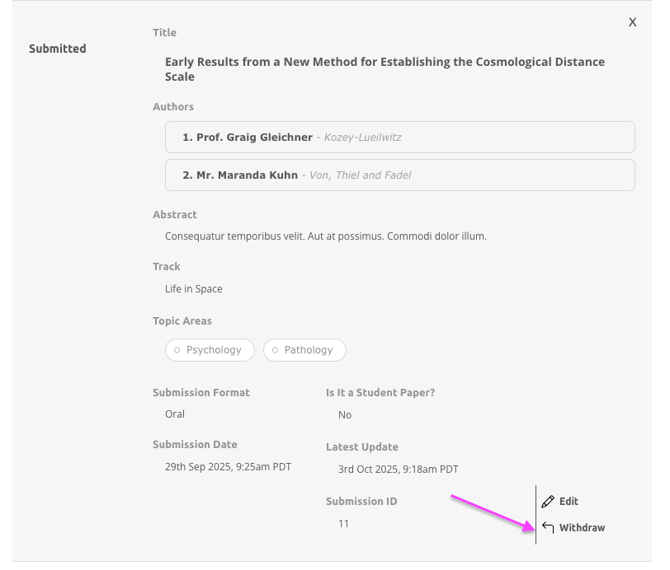
Scroll down the page to the options at the bottom. Click Withdraw. The status of the submission will now be marked as Withdrawn. Conference organisers might prevent you from withdrawing your submission from the Final Submissions stage; however, they can withdraw a submission for you.
And that's it! You have now withdrawn your material from the conference.