![Logo Standard Medium.png]](https://help.exordo.com/hs-fs/hubfs/Logo%20Standard%20Medium.png?height=40&name=Logo%20Standard%20Medium.png)
Need to submit for someone else? You came to the right place!
- Log into the platform using your own email address.
- Locate the Submit Abstract / Paper card on the dashboard
- Click the one of the following buttons. The buttons you see will depend on the settings the conference organisers put in place
- Submit Your Abstract
- Submit Your Paper
- Submit to an Existing Panel
- Submit a New Panel
- Follow the prompts to input key details about your work, such as the submission title.
- Click on the I'm not an Author button on the authors step
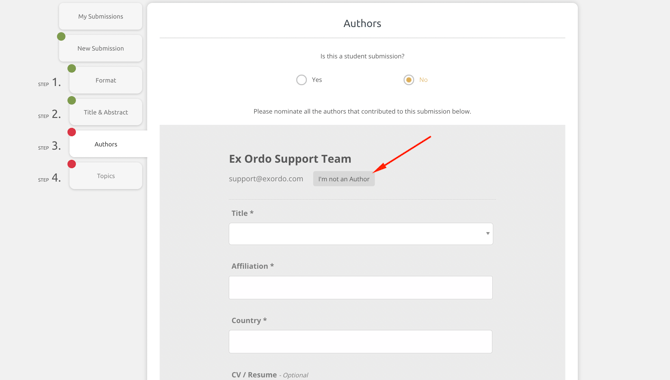
- Input the author's email
- Answer the questions related to the author, such as their first name, last name and affiliation.
- Add additional authors, if needed.
- Follow the prompts to complete the workflow.
- A submission receipt will be sent to all authors on the submission 15 minutes after the workflow is complete.
Warning!
Not all conferences allow work to be submitted by someone who is not an author. You will not see the I'm not an author button in these cases. The real authors should submit their own work.