![Logo Standard Medium.png]](https://help.exordo.com/hs-fs/hubfs/Logo%20Standard%20Medium.png?height=40&name=Logo%20Standard%20Medium.png)
The article below covers the location of presentation material when using the Ex Ordo Programme module.
A few days ahead of the conference, you will want to check all of the presentations that have been uploaded. This can be done by anyone with administrative powers in the system.
All uploaded files that you've collected through the system are saved in the Conference section. To see those files, go to the Conference hub from your dashboard as below:

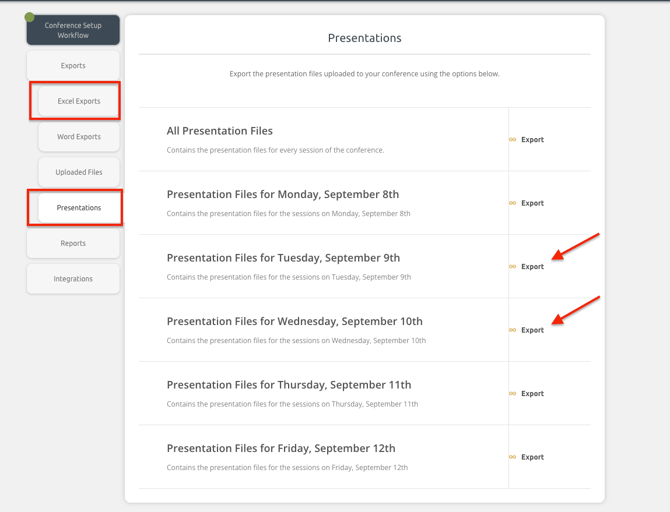
Select Exports and then Presentations. In the Presentations section, you can download the uploaded files for each day of your conference. This will download a zip file of all presentations for that specific day. The folders are named with the session code and name, so that you can easily find presentations when you need them.
If you have employed the services of an AV company, you may wish to give them administrative access. You can do so by going to:
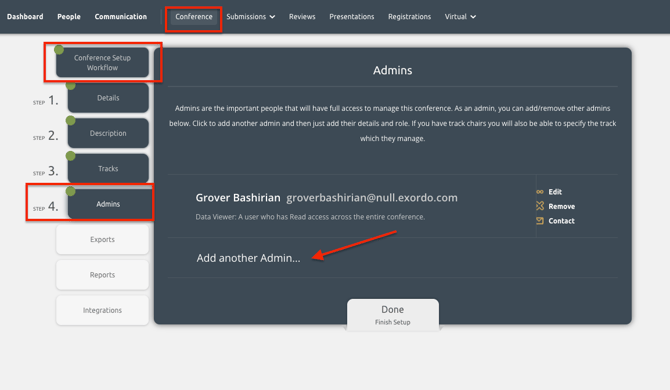
Conference > Conference Set-up Workflow > Admins and you can add their email address.
They will receive an automated email from the system asking them to log in to the conference.