![Logo Standard Medium.png]](https://help.exordo.com/hs-fs/hubfs/Logo%20Standard%20Medium.png?height=40&name=Logo%20Standard%20Medium.png)
Step 4 of the initial submissions process enables you to add topics. Setting up the topics in the system is a very important when it comes to the review. Submissions can be assigned to reviewers if they have topics in common, so it's an important step to get right.
If topics don't apply to your conference, see here for more information.
Please do not change the topics after your Call for Papers. If it is necessary to modify your topics list after you have real submissions in the system, it is very important to contact support@exordo.com first.
Adding topics:
- Navigate to the Initial Submissions hub through the Submissions menu at the top of the page and open the Configure Initial Submissions menu
- If you have not clicked through the Configure Initial Submissions yet, locate the Open Submissions card on your dashboard and click Let's Get Started.
- Open the Configure Initial Submissions menu
- Go to Step 4: Topics
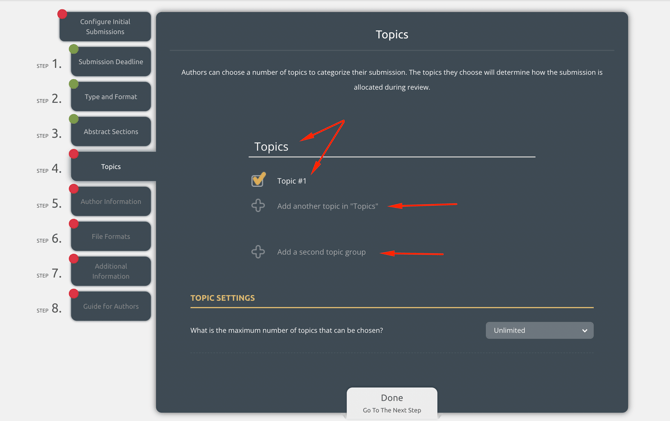
- You can now:
- Add in topics
- Add in topic groups, if needed
- Change the name of the topics or topic groups by clicking into them and typing
- Set a limit for the number of topics a submission can choose
- If using topic groups, limit authors to choosing topics from one group only
Multi Track conferences
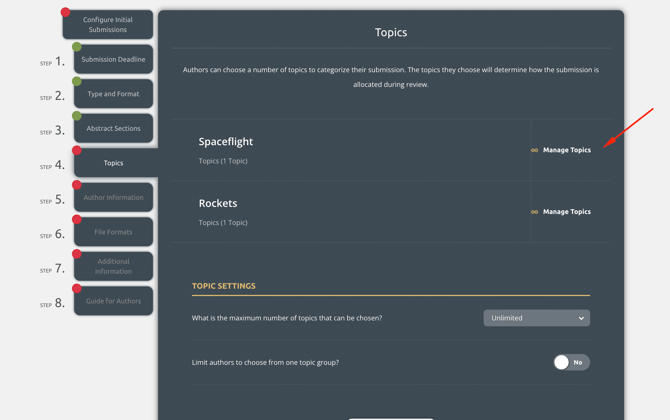
When using tracks, you will need to set topics on each. The topics can be the same on each track, but we recommend distinguishing them in someway so it is easy to read. For example:
- Spaceflight: Topic 1
- Rockets: Topic 1
- Spaceflight: Topic 2
- Rockets: Topic 2
Configuring initial submissions and happy with your submissions deadline? You can now move to step 5 of configuring initial submissions: Author Information