![Logo Standard Medium.png]](https://help.exordo.com/hs-fs/hubfs/Logo%20Standard%20Medium.png?height=40&name=Logo%20Standard%20Medium.png)
File Formats
The type of presentation file formats that can be uploaded are at the discretion of the conference chair and conference organizers. This can be configured in Step 3 of the presentation set up.
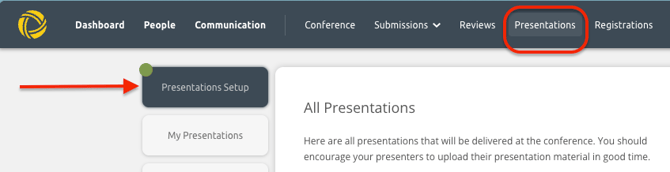
To get to the presentation configuration, click on Presentations from the dashboard, then Presentations Setup,
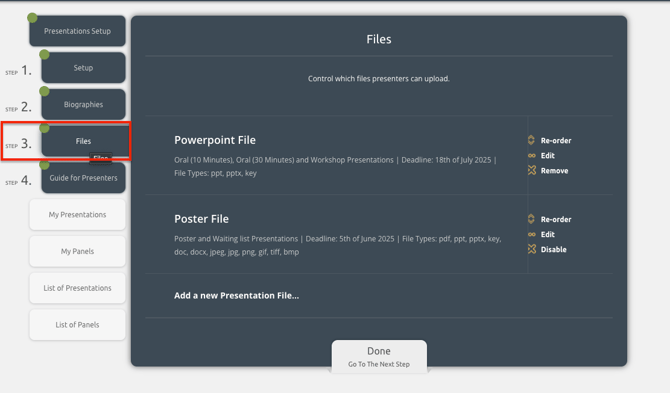
In Step 3, Presentation files, choose which format you'd like to change, and click on Edit.
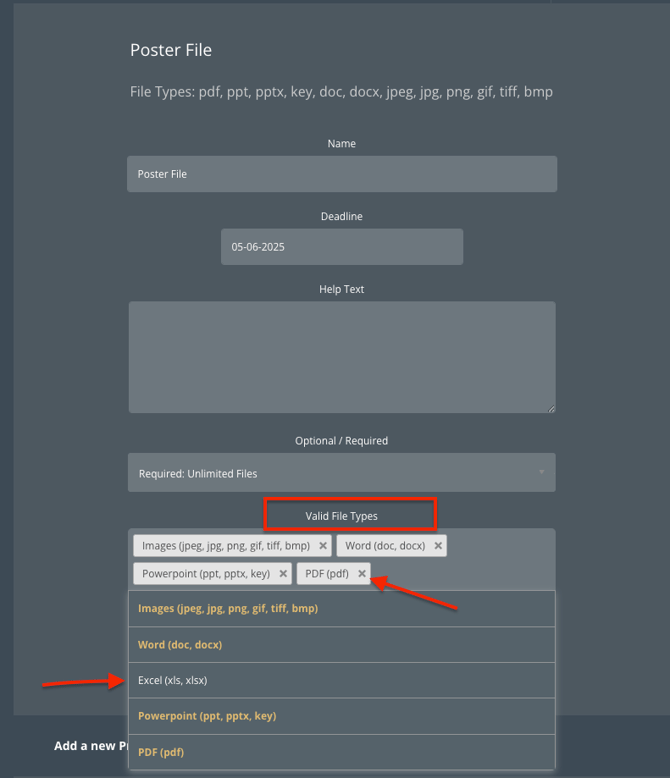
From there click on Valid file types where you will be presented with the types of presentation files that can be uploaded:
- Images: jpeg, jpg, png, jiff, bmp
- Videos: webm, mpeg4, mov, avi, mpegs, wmv, flv (if you have purchased a Virtual or video package)
- Word : doc, docx
- Excel : xls, xlsx
- Powerpoint: ppt, pptx, key
The file types in green show what file types have already been chosen. To remove a file type, just click on the " x" beside it in the dark-grey box: